
Automated Emails
Empower your outreach with automated emails, tailored to your clients' gallery interactions for a personalized touch
You delivered the photos. The gallery is live. And then... nothing. The client browsed a few images, maybe favorited a couple, but never came back. No order. No reply to that follow-up email you kept meaning to send.
This is one of the most common places photographers lose money. Not because clients don't want the photos — but because life got in the way and nobody reminded them.
The Automated Emails addon sends the right message at the right moment, without you having to think about it. Set up an email once, and it goes out every time a client hits that moment — whether that's adding something to their cart, viewing a gallery for the first time, or letting an expiration date slip past.
Catch the Moments That Matter
Every client interaction is a signal. Someone adding a photo to their favorites is telling you they're interested. Someone abandoning a cart is telling you they got distracted. Someone who was assigned a gallery but never visited? They might not even know their photos are ready.
The addon watches for 11 different triggers and sends your email automatically:
- Cart abandoned — A client added items but didn't check out. Reach them while the photos are still on their mind.
- Favorites added — They're browsing and saving images. A well-timed nudge can turn browsing into buying.
- Gallery viewed for the first time — Welcome them and guide them through what's available.
- Gallery about to expire — Remind them before it's too late. You control how far in advance the email goes out.
- Gallery expired — Follow up after the deadline with options for reopening or purchasing.
- Gallery not visited — For clients assigned to a private gallery who haven't opened it yet. Sometimes people need a second reminder.
- Order placed — Thank them, share their receipt, and suggest related galleries or products.
- New registration — Welcome new users and point them toward their galleries.
- Email access provided — When someone enters their email to view a gallery, follow up while they're engaged.
- Free image downloaded — They took the freebie. Now offer the full resolution, a print, or a package.
- Free gallery downloaded — Same idea, at the gallery level.
You choose the timing for each one. Send it 1 hour after the trigger, 3 days later, or 2 weeks out — whatever fits the situation.
Emails That Sound Like You, Not a Robot
Nobody responds well to generic marketing emails. The addon gives you over 30 personalization tags so every email reads like you wrote it yourself.
Use [first_name] to greet them by name. Include [gallery_name] and [gallery_url] so they can jump straight back to their photos. Show them exactly what they left behind with [cart] and [favorites], which render the actual images and products right in the email. Reference their [order_total] and link directly to their [receipt_link] in post-purchase follow-ups.
You can even include a preview of their gallery with [gallery_featured_image] or [gallery_images], pulling real photos into the email body. When a client sees their own images in their inbox, that's a much stronger prompt to act than a block of text.
Target the Right People
Not every email should go to every person. Each automated email includes recipient filtering so you can narrow down who receives it based on their actual behavior:
- Only email people who have items in their cart
- Only reach people who've added favorites
- Skip clients who already purchased from that gallery
- Target first-time visitors who haven't converted yet
This means you can create multiple emails for the same trigger with different audiences. Send one version of your gallery expiration email to people who have items in their cart (with urgency) and a different version to people who haven't interacted at all (with a softer reintroduction).
Turn Reminders into Revenue with Unique Discounts
Pair this addon with the Discount Codes addon and you can automatically generate a unique coupon code for each recipient. Each code is single-use and tied to that specific email, so you stay in control.
You also set how long the discount is valid. Generate a code that expires 48 hours after the email is sent to create a genuine limited window that motivates action.
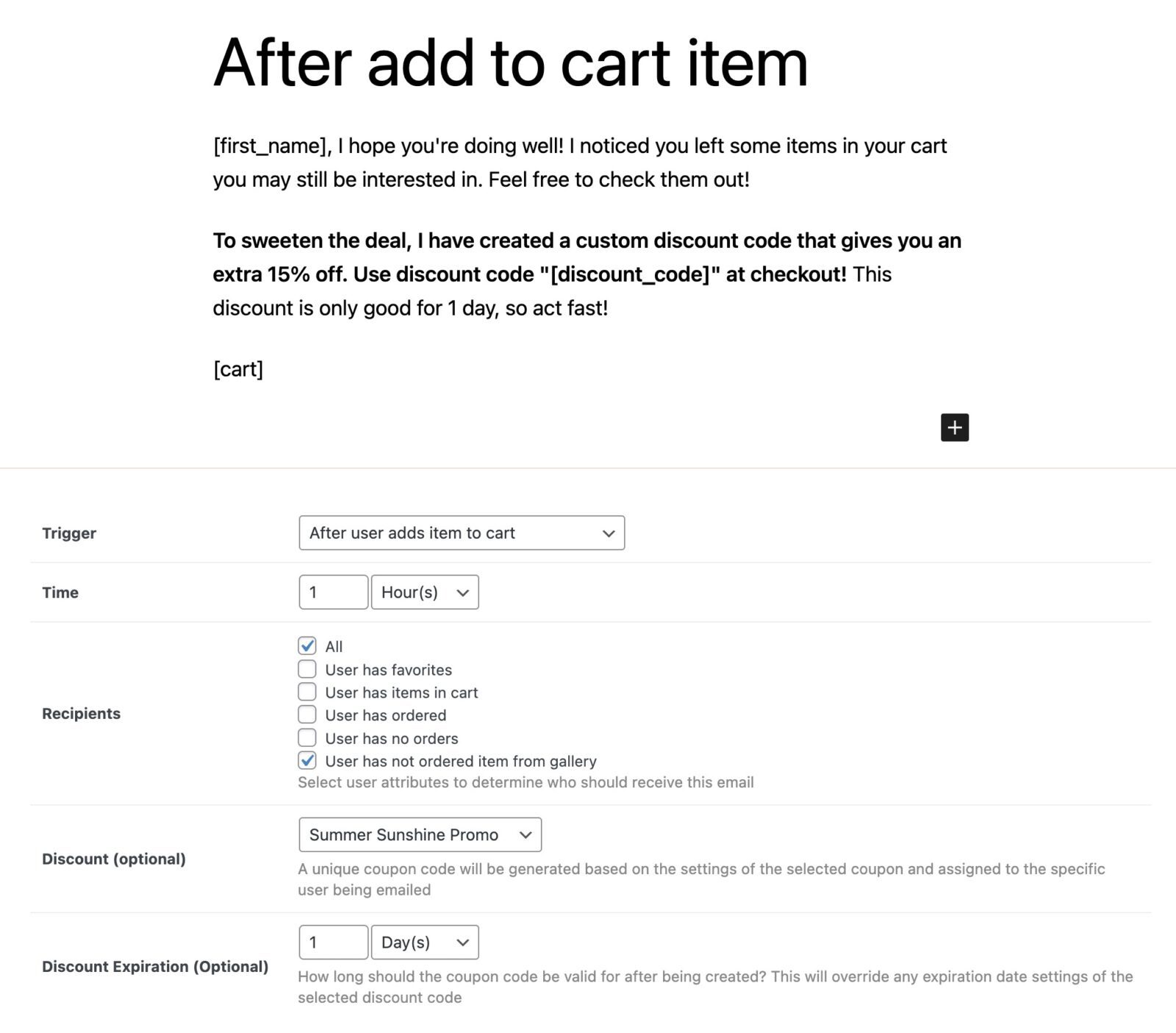
An example automated email campaign that sends an email 1 hour after a customer has added an item to cart but not completed checkout. A unique discount code is also generated which expires in 1 day from when the email is sent.
Works with Gallery Invitations
If you use the Messaging addon to invite clients to view their gallery, you can set up an automated follow-up that sends after the invitation. Pair this with the "gallery not visited" trigger and you have a two-step system: invite the client, then automatically remind anyone who hasn't opened their gallery within a few days.
Set It Up Once, Let It Run
Each automated email takes just a few minutes to configure:
- Pick a trigger — what action starts the clock
- Set the timing — hours, days, or months after the trigger
- Choose your recipients — who should get this email based on their behavior
- Write the email — use the WordPress editor with personalization tags
- Optionally attach a discount — auto-generate a unique code per recipient
Emails are processed automatically in the background. A full email log tracks every message — when it was sent, to whom, and what it contained — so you always know what's going out.
You can also exclude specific galleries from any email, which is useful for sample galleries or internal test galleries where automated follow-ups don't make sense.
Common Setups
Here are a few campaigns photographers typically create:
The abandoned cart recovery: Send 2 hours after a client adds an item to their cart. Filter to recipients who still have items in cart. Include [cart] to show them what they left behind, and attach a 10% discount that expires in 24 hours.
The expiration warning: Send 7 days before a gallery expires. Include [gallery_name], [gallery_expiration_date], and [gallery_url]. Follow it with a second email triggered after the gallery expires, offering to reopen it.
The first-visit welcome: Send 1 hour after a client views their gallery for the first time. Include [gallery_featured_image] and a warm message pointing them to favorites and ordering.
The no-show nudge: Send 3 days after a gallery is created for clients who were assigned but never visited. Include [gallery_url] so they can click straight through.
The post-order thank you: Send 1 day after an order is placed. Reference [order_total], link to [receipt_link], and suggest they share the gallery with family and friends.
$89
- 14-day money back guarantee
- 1-on-1 customer support
- Safe & secure online payment
Add-ons are billed yearly. You may cancel your subscription at any time. An active license is required for updates and support. View terms
Get a plan and save!
This add-on is part of our Pro plan and you can save big compared to buying individually.
Latest Version: 3.1.2


Try Sunshine Photo Cart Free
Build your galleries and start selling on your own WordPress website in minutes. Our fully functional free version is a great option for many photographers.