
Payment Gateway Fees
Add a fee to orders when customers pay with a specific payment method. This helps offset processing costs from payment providers like Stripe or PayPal.
Why Use Payment Gateway Fees
Payment processors charge you a percentage of each transaction (typically 2.9% + $0.30 for credit cards). You can pass some or all of this cost to your customers by adding a payment method fee.
Common use cases:
- Offset credit card fees — Add a small percentage to cover Stripe or PayPal processing costs
- Encourage preferred payment methods — Add no fee to methods you prefer, and a small fee to others
- Transparent pricing — Some photographers prefer to show processing costs separately rather than building them into product prices
How to Set It Up
- Go to Sunshine > Settings > Payment Methods
- Click on the payment method you want to add a fee to
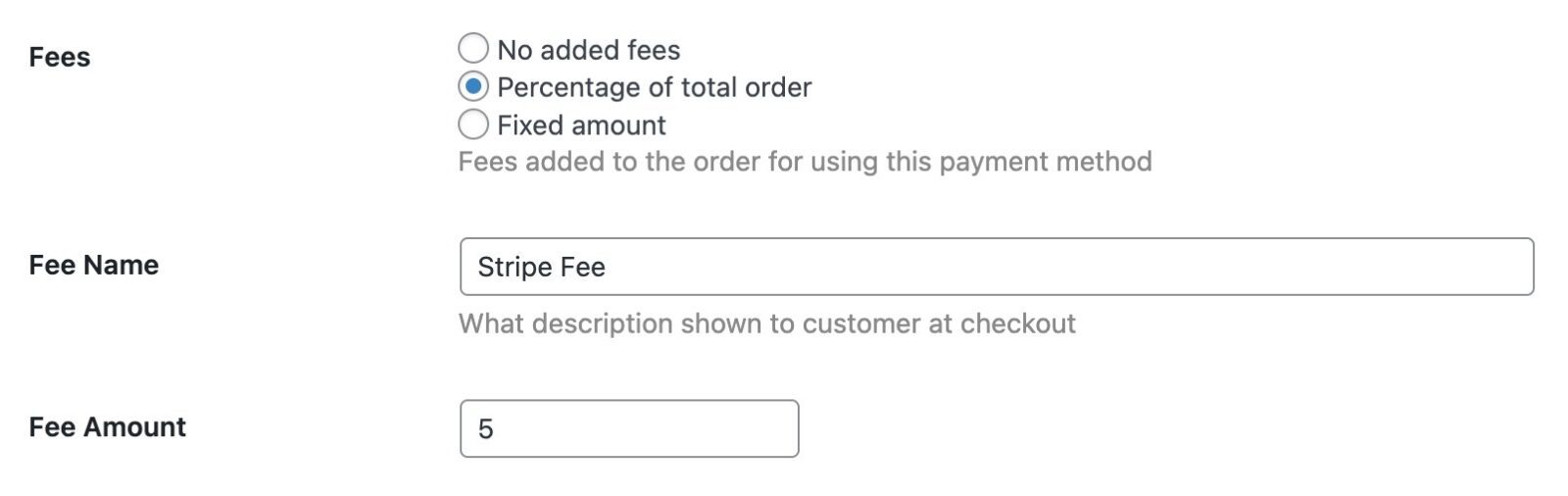
- Find the Fee Type setting and choose one of:
- None — No fee added (default)
- Percentage — A percentage of the order total
- Amount — A fixed dollar amount
- Enter the Fee Amount (either a percentage like
3or a fixed amount like2.50) - Optionally customize the Fee Name that customers see
- Save your settings
Repeat for each payment method you want to add fees to.
How It Works
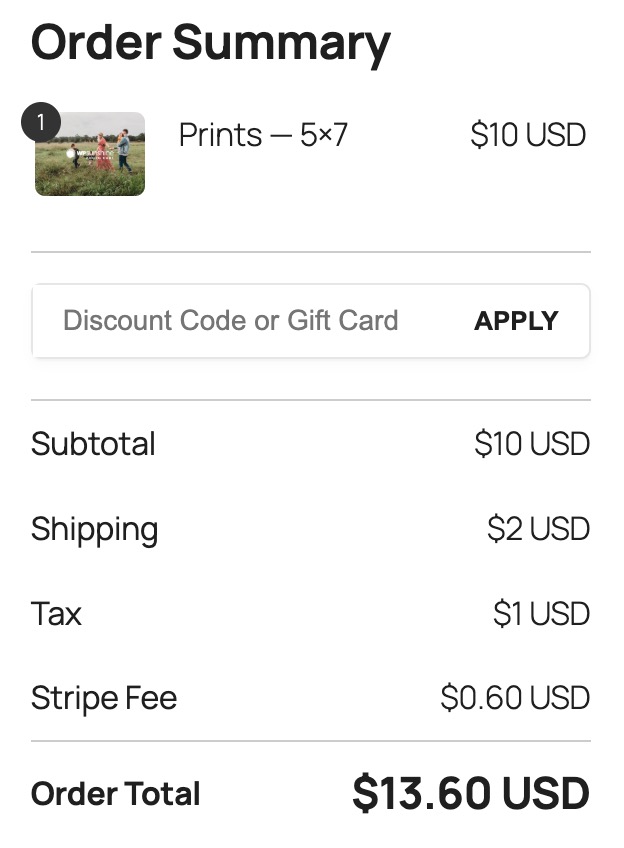
When a customer selects a payment method at checkout, the fee (if any) is immediately calculated and added to their order total.
- Percentage fees are calculated on the order subtotal, shipping, and tax — but exclude other fees to prevent double-charging
- Fixed fees are added as-is regardless of order total
The fee appears as a separate line item in:
- The checkout summary
- Order confirmation emails
- The customer's order details page
- Invoices
- Your admin order view
What customer sees during checkout
Notes
- Fees are calculated when the customer selects their payment method. If they switch methods, the fee updates automatically.
- The fee name you set is visible to customers. Keep it clear and professional (e.g., "Credit card processing fee" or "PayPal fee").
- Percentage fees use the format
3for 3%, not0.03. - Fees are applied after discounts and credits, so customers still benefit from discount codes.
Still need help?
If you have not yet found your answer in the documentation articles, please contact support